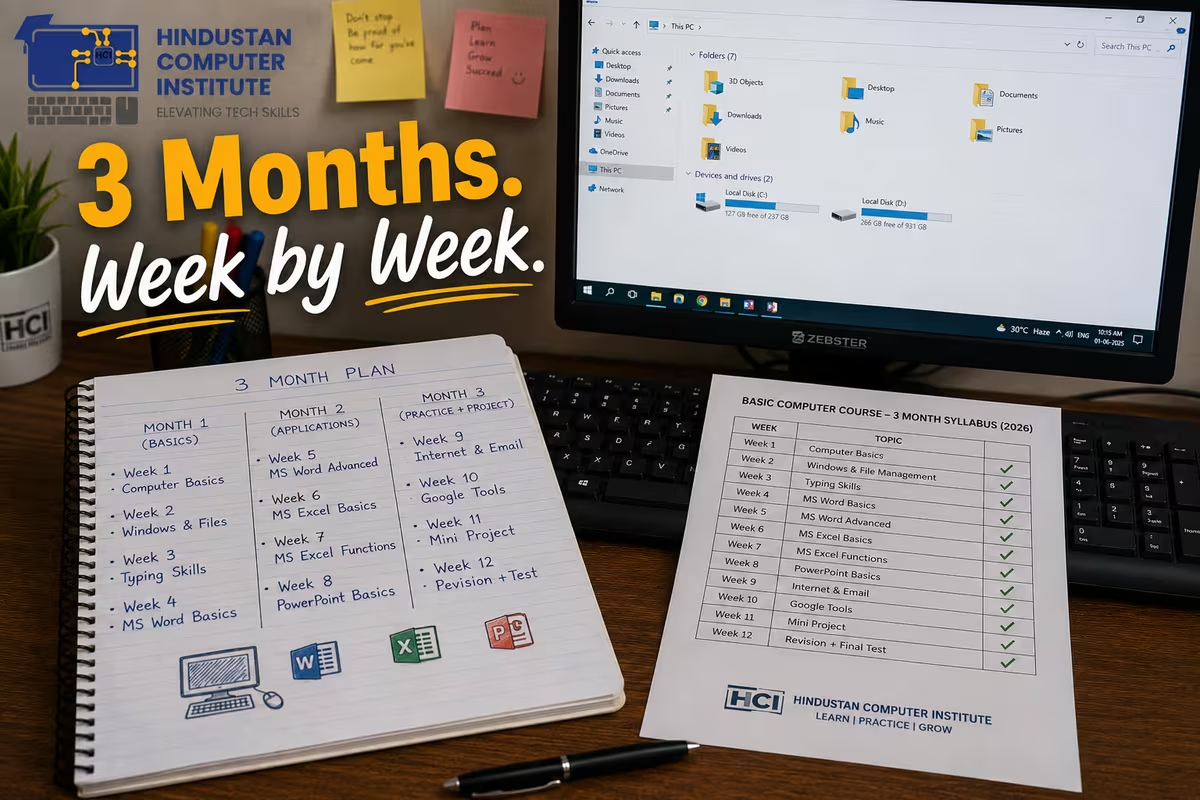
A basic computer course syllabus in 2026 runs about three months and covers four blocks: computer and operating system fundamentals, MS Office (Word, Excel, PowerPoint), internet and email, and digital payments with online safety. Typing practice runs alongside all of it from week one rather than sitting as a separate module at the end.
What does a basic computer course syllabus cover? (Quick Answer)
There is no single national body that fixes the basic computer course syllabus, which is why every institute publishes a slightly different list. What does not change is the sequence. You learn the machine, then the operating system, then the software, then the internet. Skip a step and the next one takes twice as long.
Below is the week-by-week structure we run at HCI. If you are comparing institutes, hold their syllabus against this one and ask about anything missing.
Full 3-month basic computer course syllabus
| Week | Module | What you can do by the end of it |
|---|---|---|
| 1 | Computer fundamentals, hardware, input/output devices | Name every part of the machine and explain what it does |
| 2 | Windows OS, files, folders, control panel, shortcuts | Organise files properly and find anything you saved |
| 3–4 | MS Word: formatting, tables, page setup, printing | Type and print a formatted application letter unaided |
| 5–7 | MS Excel: cells, formulas, SUM/AVERAGE/IF, sorting, charts | Build a working attendance or expense sheet |
| 8 | MS PowerPoint: slides, transitions, delivering a deck | Make and present a 10-slide presentation |
| 9 | Internet, browsers, search, downloads, Google Drive | Search effectively and store work in the cloud |
| 10 | Email: writing, attachments, folders, professional tone | Send a job application with an attached resume |
| 11 | Digital payments: UPI, net banking, online forms, safety | Fill a government form and pay online without help |
| 12 | Cyber safety, passwords, scams + final practical test | Spot a phishing message and pass the practical |
| 1–12 | Typing practice (runs throughout) | Reach 20–25 WPM with reasonable accuracy |
The two weeks everyone underestimates
Weeks 5 to 7. Excel is where a beginner course either works or quietly fails, and three weeks is the honest minimum. Students arrive expecting Excel to be "a table," discover formulas in week six, and that is the point where attendance either holds or drops.
The first two weeks feel slow and pointless while you are in them. Naming hardware parts, dragging files into folders. It feels like you are not learning a computer, you are learning vocabulary. Then week five arrives, and the students who did weeks one and two properly can find the file they saved yesterday while the ones who skipped are still hunting through Downloads. We refuse to compress the file-management week, however much a student wants to jump ahead to Excel, and that is the request we get most often.
Week 11 has become the module that changes lives fastest. Filling a government form and making a UPI payment without asking a neighbour for help is, for a lot of our students in Billawar and the villages around Kathua, the actual reason they enrolled.
What you can do with a basic computer course
A three-month basic course is not a job qualification on its own, and any institute promising you otherwise is selling. What it is: the prerequisite for everything else. CCC becomes an exam you sit rather than a subject you cram. Data entry work becomes possible once your typing crosses 25 WPM. Shop billing, school admin and panchayat-level clerical work all sit within reach.
Entry-level data entry and office assistant roles in J&K advertise roughly ₹8,000 to ₹15,000 a month [uncertain - depends heavily on typing speed and whether the role is contractual]. Students who continued into a longer 12-month advanced diploma after finishing the basics consistently did better than those who stopped at three months, which is not surprising but is worth saying plainly.
What this syllabus deliberately leaves out
Worth saying what is not in a three-month basic course, because institutes advertising twenty modules in ninety days are counting things they mention once.
There is no programming. No Python, no HTML, no coding of any kind. Those belong in a longer diploma or in O Level, and squeezing an introduction to them into week eleven produces a student who can define a variable and do nothing with one.
There is no accounting software. Tally Prime is a course in itself, not a module, and a basic batch that promises Tally is giving you two sessions on the opening screen.
There is no advanced Excel. You will learn cells, formulas, SUM, AVERAGE, IF, sorting and a chart. You will not learn pivot tables, VLOOKUP or nested conditionals in week six, because you met a spreadsheet for the first time in week five.
And there is no design or video work. Photoshop and editing tools show up in course brochures because they sound appealing, and they do not fit alongside teaching someone to save a file.
A three-month course that covers the ten blocks in the table above, properly, produces someone who can work. A three-month course that also claims Tally, Photoshop and coding produces someone who has heard of all of them. When you compare syllabi, a shorter list is often the more honest one.
Why do the basic computer course at Hindustan Computer Institute?
Every student gets their own machine during practical hours. That sounds like a small detail until you have watched a shared-keyboard class, where one student types for three months and the other one watches them do it. Our 3-month basic computer course runs in the ₹4,000 to ₹5,000 range, and the institute is ISO 9001:2015 certified and registered with MSME and the Ministry of Corporate Affairs, with 2,500+ students trained out of Billawar.
The syllabus above is the one we teach, published so you can compare it against anyone else's before you pay.
Conclusion
Three months is enough to go from never having touched a computer to filling forms, writing letters, building a spreadsheet and paying online safely. It is not enough to make you employable on its own, and you should be suspicious of anyone who says it is. Use the syllabus above to compare institutes, and ask each one how many hours you personally get on a keyboard. Visit our Billawar centre to see the lab, or book a free counselling session and we will tell you whether three months or a longer diploma fits what you are trying to do.