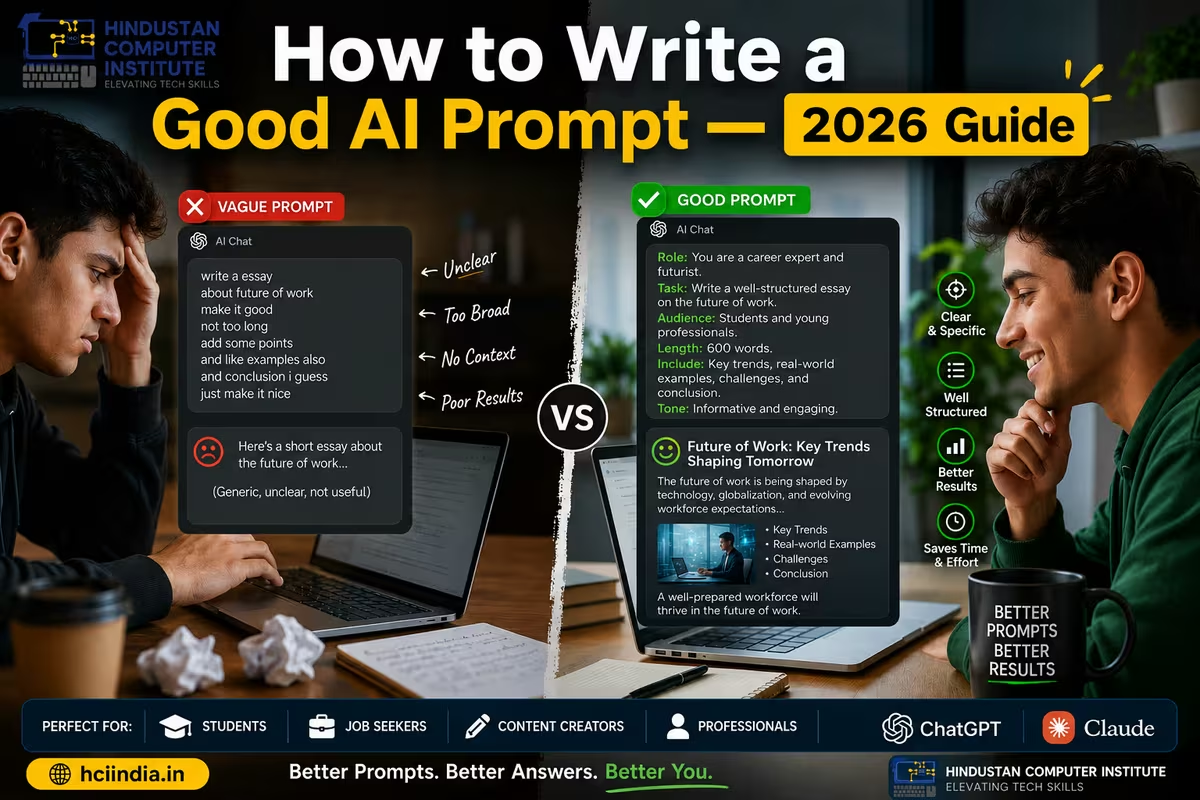
Most people who say "AI doesn't work" are actually writing bad prompts. If you want to know how to write a good AI prompt, the answer is simpler than you think - the AI is not the problem, the instruction is. Whether you are using ChatGPT, Claude, or Gemini, the quality of your output is almost entirely determined by the quality of your input. This guide explains what separates a good prompt from a bad one, with real side-by-side examples you can learn from immediately.
What Is a Prompt - and Why Does It Matter?
A prompt is the instruction you give to an AI model. It is how you tell the AI what you want - the topic, the format, the tone, the length, the purpose. Think of it like giving instructions to a very capable assistant who has no context about your life, your job, or what "good" looks like for you. The more clearly you explain what you want, the better the result you get back.
In 2026, prompt writing has become a genuine skill - one that determines whether a student gets a helpful essay outline or a generic paragraph, whether a job seeker gets a strong cover letter or a flat template, and whether a business owner gets a working social media caption or a sentence that could apply to any company on earth. The difference is not which AI tool you use. The difference is how you ask.
Good vs Bad Prompt Examples - 5 Side-by-Side Comparisons
| Situation | Bad Prompt | Good Prompt | What Changed |
|---|---|---|---|
| Writing a cover letter | "Write me a cover letter" | "Write a cover letter for a data entry job at a government office in J&K. I am a Class 12 pass with an ADCA diploma from HCI Billawar. Keep it formal, under 200 words." | Added role, employer type, qualifications, tone, and length |
| Explaining a concept | "Explain GST" | "Explain GST to a Class 12 commerce student in simple Hindi-English mixed language. Give 3 real-life examples from a small shop owner's perspective." | Added audience, language preference, format, and real-world context |
| Social media caption | "Write a caption for my post" | "Write an Instagram caption for a computer training institute in Billawar, J&K. The post is about our new AI tools batch starting in June 2026. Tone: friendly and encouraging. Include one call to action. Under 80 words." | Added business type, location, topic, tone, action, and word limit |
| Exam preparation | "Help me study for my exam" | "I have a JKSSB computer operator exam in 3 weeks. Create a 21-day study plan covering MS Office, basic networking, and typing speed. I can study 2 hours daily. Give it as a day-by-day schedule." | Added exam name, timeline, topics, daily availability, and output format |
| Email drafting | "Write an email to my teacher" | "Write a polite email to my computer course instructor asking to reschedule my practical exam from Monday to Wednesday. Reason: I have a family function. Keep it respectful and under 100 words." | Added recipient role, purpose, specific dates, reason, tone, and length |
The 5 Things Every Good Prompt Includes
You do not need to be a prompt engineering expert to write good prompts. You just need to include the right information. Here are the five things that separate a good prompt from a bad one - every time.
1. Role or Audience - Tell the AI who it is writing for, or who you are. "Explain this to a Class 10 student" gives completely different output than "Explain this to a CA finalist." The same information gets framed, simplified, or expanded based on audience. If you want the AI to take on a persona - "Act as an experienced HR manager" - that also belongs here.
2. Task and Topic - Be specific about what you actually want. "Write a caption" is too vague. "Write an Instagram caption for my coaching centre's new batch announcement" is a task. The more specific the task, the more useful the output.
3. Format and Length - Tell the AI how you want the answer structured. Do you want bullet points or a paragraph? A 100-word summary or a 500-word article? A table or a numbered list? Without this, the AI guesses - and usually guesses wrong for your specific purpose.
4. Tone and Style - Formal or casual? In Hindi or English? Professional or friendly? Serious or humorous? The default AI tone is neutral and slightly formal. If you need something different, say so explicitly.
5. Context and Constraints - Any background information the AI needs to do the job well. Your location, your qualification, your deadline, your budget, your target customer. Constraints like "no jargon", "avoid mentioning competitors", or "only use examples from J&K" also go here.
Why Most Students and Professionals Write Bad Prompts
The three most common mistakes - and how to fix them.
The first mistake is being too vague. Most bad prompts fail because the person wrote what they were thinking about, not what they actually needed. "Tell me about computers" is a thought, not an instruction. The fix: ask yourself, "If a human assistant read this prompt, would they know exactly what to produce?" If the answer is no, add more detail before submitting.
The second mistake is no context about the output. Bad prompt writers describe the topic but forget to say what they want done with it. "Tally Prime" tells the AI the subject. "Write 5 interview questions that an employer would ask a Tally Prime operator applying for an accounting job at a Kathua-based trading firm" tells the AI the subject, the format, the use case, and the context. Same topic - completely different result.
The third mistake is one-shot thinking. Most people write one prompt, get a mediocre result, and either accept it or give up. Better prompt writers treat AI like a conversation. If the first response is 80% right, follow up: "Good - now make it shorter and more formal" or "Rewrite the second paragraph with a more local J&K flavour." Iteration is a skill, not a workaround.
Want to learn AI tools and prompt writing as part of a full computer course?
HCI Billawar's ADCA and MDCAA programmes now include dedicated AI tools modules - covering ChatGPT, Claude, Google Gemini, and prompt engineering for real job tasks. Batches available offline and online.
👉 Book a free counselling session here - call +91 94191-91044. No commitment required.
The Simple Prompt Formula You Can Use Right Now
If you want a single template to improve your prompts immediately, use this structure: [Role] + [Task] + [Topic] + [Format] + [Tone] + [Constraint]. You do not need every element every time - but including at least three or four of these will almost always produce a noticeably better result than a one-line prompt.
Example using the formula: "You are a career counsellor [Role]. Write a short motivational message [Task] for a student from Kathua district who just completed their ADCA computer course [Topic]. Use 3 bullet points [Format]. Keep it warm and encouraging [Tone]. Under 80 words [Constraint]."
Compare that to: "Write something encouraging for a student." The formula adds maybe 20 extra words. The quality difference in the output is significant.
3 Proven Prompt Frameworks You Can Use Today
Beyond the basic formula, experienced prompt writers use structured frameworks to get consistently excellent results. Here are three of the most practical frameworks - each with a real example relevant to students and professionals in India.
1. RTF Framework - Role, Task, Format
RTF is the simplest and fastest prompt framework. It has only three parts - Role, Task, and Format - but these three elements alone are enough to dramatically improve the quality of any quick AI output. Think of RTF as your everyday framework: the one you use when you need something done fast and the task is clear in your head.
Most people write prompts with only the Task - they say what they want, but forget to tell the AI who should be writing it and how it should be structured. That is why their output feels generic. RTF fixes both of those gaps in one step.Element What It Means What to Write Why It Matters R - Role Who the AI should act as "Act as an experienced HR manager" / "You are a Class 12 Hindi teacher" Sets the expertise level and tone. A doctor explains differently than a teacher. T - Task What exactly you need done "Write 5 interview questions for a data entry job" The more specific the task, the more focused the output. Vague task = vague answer. F - Format How the output should look "Numbered list. Each question followed by a 2-line answer tip." Without this, AI guesses the format - usually wrong for your specific use.
Without RTF (bad prompt): "Write some interview questions for a job."
With RTF (good prompt): "Act as an experienced HR manager at a government office in J&K [Role]. Write 5 interview questions for a data entry operator position [Task]. Present as a numbered list - each question followed by a 2-line tip on how to answer it confidently [Format]."
The second prompt takes 15 extra seconds to write. The output is 10 times more usable. RTF works best for: writing captions, drafting short emails, creating tip lists, generating study questions, and any task you can describe in one clear sentence. If your task needs more than one sentence to explain, move to RISEN.
2. RISEN Framework - Role, Instructions, Steps, End Goal, Narrowing
RISEN is the framework to use when your task is too complex for RTF. Where RTF tells the AI what you want, RISEN tells the AI what you want, how to approach it, what the structure should be, what success looks like, and what constraints to stay within. That is five layers of clarity instead of three - which is why RISEN produces significantly more structured and useful output for complex tasks.
Students, trainers, content writers, and business owners working on anything that has multiple parts - a study plan, a training module, a detailed report, a course outline - will find RISEN gives them almost exactly what they need on the first try, with very little rewriting required.Element What It Means What to Write Why It Matters R - Role The AI's persona or area of expertise "You are a career counsellor specialising in government jobs in J&K" Defines the knowledge base and tone the AI draws from. I - Instructions The core task - what needs to be created or done "Create a 4-week preparation guide for the JKSSB computer operator exam" The main job. Be specific about what the output should be. S - Steps The structure or sequence the output should follow "Week 1 - MS Office, Week 2 - Networking, Week 3 - Tally and Typing, Week 4 - Revision" Prevents the AI from making up its own structure that may not fit your needs. E - End Goal What the final result should achieve "The student should feel fully ready and confident by the end of Week 4" Gives the AI a purpose to optimise toward - not just filling space. N - Narrowing Constraints that keep the output focused and usable "Under 400 words. Use simple Hinglish. No technical jargon. Day-by-day format." Without this, AI often over-explains or writes for the wrong audience.
Without RISEN (bad prompt): "Help me prepare for my JKSSB exam."
With RISEN (good prompt): "You are a career counsellor specialising in government jobs in J&K [Role]. Create a 4-week preparation guide for a student appearing in the JKSSB computer operator exam [Instructions]. Structure it week by week: Week 1 - MS Office basics, Week 2 - Networking and Internet, Week 3 - Tally and Typing Speed, Week 4 - Revision and Mock Tests [Steps]. The student should feel fully ready and confident to appear for the exam by the end [End Goal]. Keep it under 400 words, use simple Hinglish, avoid technical jargon, and present it as a day-by-day schedule [Narrowing]."
Notice how the RISEN prompt tells the AI not just what to write, but how to organise it and who it is writing for. The AI cannot go off-track because every important decision has already been made in the prompt. RISEN is also extremely effective for writing social media content calendars, lesson plans, business proposals, and any document that needs a clear beginning, middle, and end.
3. RHODES Framework - Role, Hook, Objective, Details, Examples, Sense Check
RHODES is the most advanced framework in this guide and is built specifically for high-quality content creation. If RTF is for quick tasks and RISEN is for structured tasks, RHODES is for content that needs to be genuinely good - blog posts, marketing copy, training materials, formal reports, and anything where the reader's first impression matters.
What separates RHODES from the other two frameworks is the addition of Hook and Sense Check. The Hook tells the AI how to open the content so it immediately grabs the reader's attention, instead of starting with a generic introduction. The Sense Check asks the AI to review its own output and flag anything that seems wrong, outdated, or unclear for your specific audience - which acts as a built-in quality control step that most people never think to include.Element What It Means What to Write Why It Matters R - Role Who the AI is writing as - expertise and audience awareness "You are a digital marketing expert writing for small shop owners in Tier 2 cities in India" Sets both the knowledge level and the reader's perspective the AI writes toward. H - Hook How the content should open to immediately grab attention "Start with this problem: most shops in J&K have no online presence and are losing customers to bigger cities" A strong opening keeps readers on the page. Generic openings lose them in the first 5 seconds. O - Objective The single clear purpose the content must achieve "The reader should feel motivated to set up a free Google Business Profile before they close this page" Without a clear objective, the content drifts and fails to move the reader to action. D - Details The key points, facts, sections, or structure to include "Cover: what Google Business Profile is, 3 real benefits for small shops, step-by-step setup in 10 minutes" Ensures nothing important is left out. AI fills gaps with generic filler when details are missing. E - Examples Specific real-world examples or references to include "Use examples of a medical shop, a coaching centre, and a tailor - all based in Kathua, J&K" Local, specific examples make content feel real and relatable. Generic examples feel like any other article. S - Sense Check Ask the AI to flag anything that seems wrong, unclear, or not right for your audience "If any step is outdated, technically incorrect, or confusing for a non-tech reader, flag it at the end" Acts as a built-in quality review. Catches errors before you publish, not after.
Without RHODES (bad prompt): "Write a blog post about Google Business Profile for shop owners."
With RHODES (good prompt): "You are a digital marketing expert writing for small shop owners in Tier 2 cities in India [Role]. Open with the problem that most shops in J&K have no digital presence and are losing customers to bigger cities [Hook]. The goal is to convince the reader to set up a free Google Business Profile today - before closing this page [Objective]. Cover what it is, 3 real benefits for small shops, and a simple 10-minute setup process [Details]. Use examples of a medical shop, a coaching centre, and a tailor based in Kathua [Examples]. If any step is outdated or confusing for a non-tech reader, flag it clearly at the end [Sense Check]."
The RHODES prompt takes about 2-3 minutes to write carefully. But it produces content that is specific, engaging, locally relevant, and self-reviewed - four things that most AI-generated content completely lacks. If you are writing content for HCI's website, social media, or any student-facing material, RHODES is the framework that will make your content stand out from the thousands of generic AI articles published every day.
Quick reminder - which framework when: Use RTF for anything quick and single-purpose. Use RISEN when your output needs a clear structure with multiple sections. Use RHODES when you are creating content that needs to engage, inform, and move the reader to action.
Which framework should you use?
Quick task → RTF. Complex task with multiple steps → RISEN. Content that needs to engage and convert → RHODES. All three are now part of the AI Tools module in HCI Billawar's ADCA and MDCAA programmes.
👉 Book a free counselling session here - call +91 94191-91044.
Conclusion
The gap between "AI is useless" and "AI saves me hours every day" is almost always a prompt. A bad prompt gets you generic, half-relevant output that you have to rewrite yourself. A good prompt - one that includes role, task, format, tone, and context - gets you something you can actually use. The formula is not complicated. The habit of applying it consistently is what separates people who get real value from AI tools in 2026 from those who give up after one disappointing result.
If you want to build this skill properly - alongside the full computer applications training that makes it genuinely employable - call HCI at +91 94191-91044 or book a free counselling session online. Our ADCA and MDCAA programmes include AI tools modules covering practical prompt writing, ChatGPT, and Google Workspace AI features.
Author: Dinesh Sharma, Founder & CEO, Hindustan Computer Institute
Last Updated: May 2026